Clients
Advanced feature: The Clients section is for people building services or automated tools that use Lumen. Regular users won't need this page.
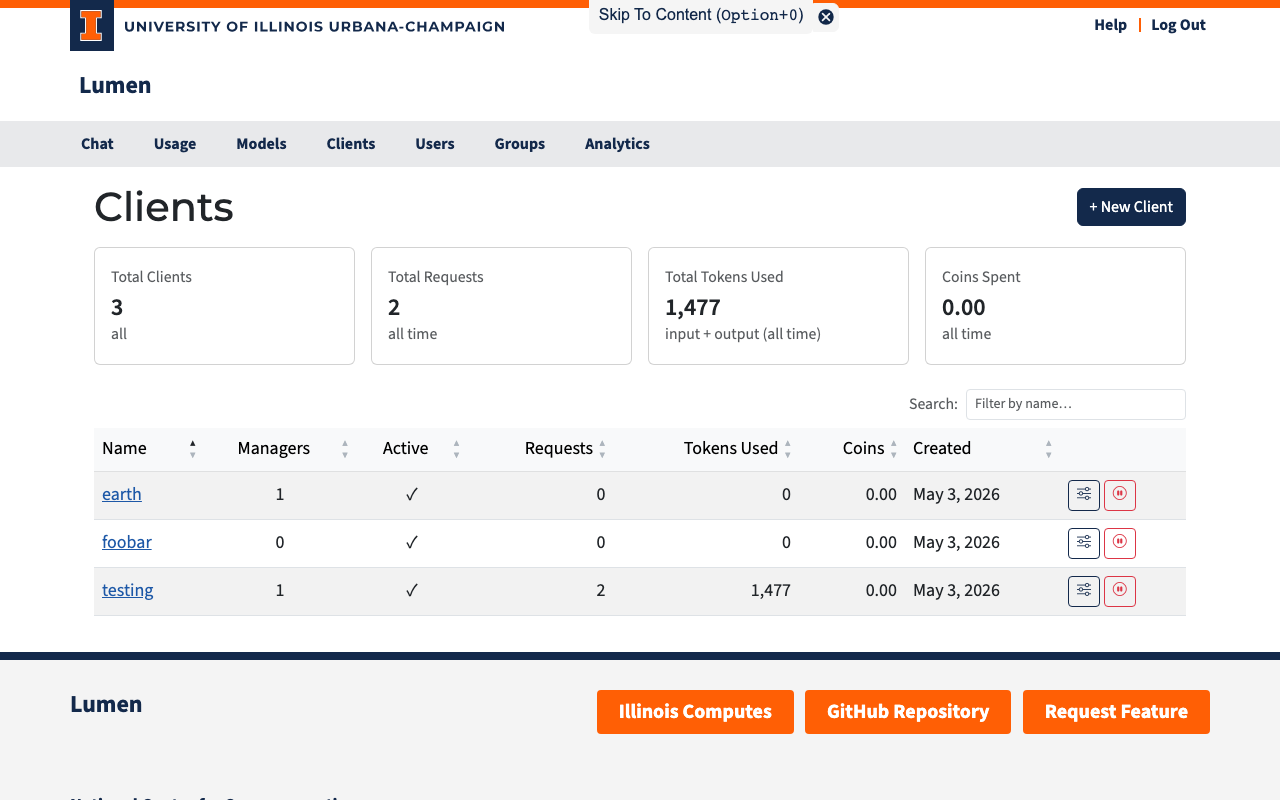
The Clients page (/clients) is where you manage application clients — named identities for services or automated processes that need their own API access.
What Is a Client?
A client is a named entity separate from your personal user account. It has its own API keys, coin pool, and usage counters. Clients are useful when you need to:
- Build an application or service that calls AI models on behalf of users
- Run automated pipelines or scripts that need stable, long-lived credentials
- Separate application usage from your personal usage and budget
- Allow a team to share access to a set of credentials without sharing anyone's personal key
Think of a client as a shared identity for automated tools: it has a name (e.g., research-bot, data-pipeline), it accumulates its own usage history, and its API keys are managed independently.
Who Can See What
| Role | Visibility |
|---|---|
| Admin | All clients in the system |
| Manager | Only clients they are assigned to manage |
If you are a manager of one or more clients, you will see them listed here. If you don't see the Clients page at all, your account has not been assigned as a manager of any client.
Summary Cards
At the top of the page, four cards summarize the clients you can see:
| Card | Description |
|---|---|
| Total Clients | Number of clients visible to you |
| Total Requests | Combined API requests across all visible clients |
| Total Tokens Used | Combined input + output tokens |
| Coins Spent | Combined coin cost |
Client Table
| Column | Description |
|---|---|
| Name | Clickable link to the client detail page |
| Managers | Number of users who manage this client |
| Active | Green checkmark for active, red X for deactivated |
| Requests | Total API requests |
| Tokens Used | Total input + output tokens |
| Coins | Total coins spent |
| Created | When the client was created |
Click any column header to sort. Use the search box to filter by name.
Creating a Client
Admin setup: Clients are created through the web interface here, but coin budgets and model access defaults are configured in
config.yaml. See Configuring Clients for details.
Only administrators can create new clients:
- Click + New Client.
- Enter a name (e.g.,
my-service-app). - Click Create.
You will be redirected to the new client's detail page where you can set up managers and API keys.