Model Detail
The model detail page (/models/<name>) shows everything you need to know about a specific model before you use it.
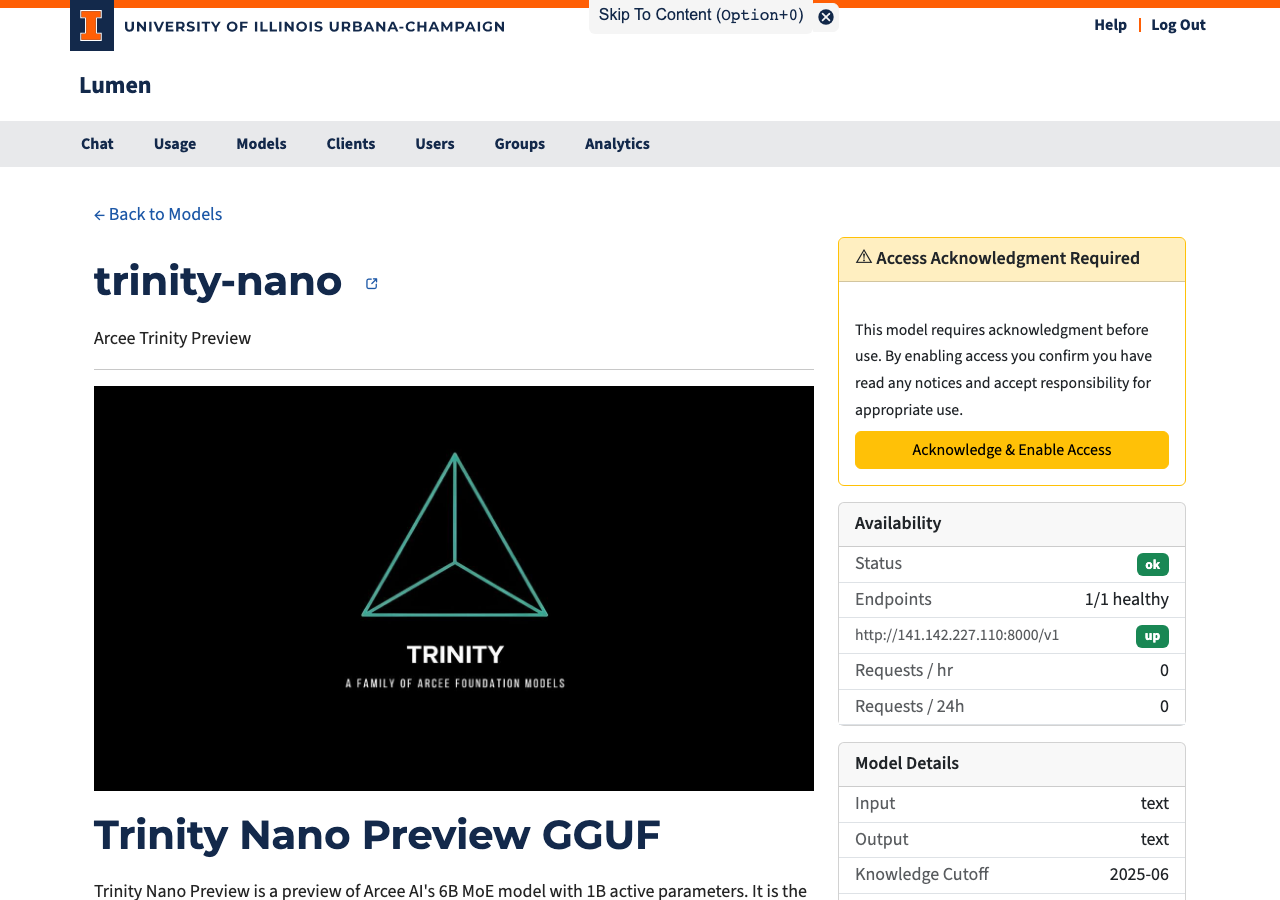
Page Layout
The page is split into two columns.
Left Column
- Model name with a link to the model's HuggingFace page (when available).
- Description — A short summary of the model.
- README — The model's full documentation, rendered from its HuggingFace repository.
Right Column
Access Status
This card appears when the model requires acknowledgment before use:
| State | What You See |
|---|---|
| Not yet acknowledged | A warning card with an "Acknowledge & Enable Access" button |
| Already acknowledged | A confirmation with the date you accepted |
| Blocked | A notice that this model is not available to you |
Click the button to give one-time consent. After acknowledging, the model is immediately available in the chat interface and API.
Availability
| Field | Description |
|---|---|
| Status | Overall health: ok / degraded / down |
| Endpoints | Healthy backend count vs. total |
| Requests / hr | Requests sent to this model in the last hour |
| Requests / 24h | Requests sent to this model in the last 24 hours |
Model Specifications
Technical details that help you decide if this model fits your task:
| Field | Description |
|---|---|
| Context Window | How much text the model can "remember" in one conversation (roughly the input plus output combined) |
| Max Output | Maximum tokens the model can generate in a single reply |
| Input | What input types the model accepts — e.g., text, images |
| Output | What the model produces — typically text |
| Knowledge Cutoff | The date beyond which the model has no training data |
| Reasoning | Checkmark if the model can show its step-by-step thinking before giving an answer |
| Function Calling | Checkmark if the model can request to run a tool (such as a search script or data query) on the user's computer via the API — not available in Lumen's built-in chat. The user explicitly agrees to each request; the model cannot access data without their consent. |
Pricing
Shows the coin cost per million input tokens and per million output tokens. See the Introduction for how coin costs are calculated.